

Magnetic loop antennas (MagLoops) are a popular choice among amateur radio enthusiasts due to their compact size, portability, and efficiency. However, like any piece of equipment, they sometimes need occasional maintenance checks. If you’re experiencing issues with your MagLoop, here are some troubleshooting tips to help you get back on the air.
- We also advice removing any other ‘devices’ or ‘cables’ that are installed between your analyzer/equipment and MagLoop. This is done in case there is an issue with those items.
1. Check the Tuning
The Basics: Magnetic loop antennas require precise tuning to operate effectively. If you’re not achieving the desired performance:
- Inspect the Capacitor: Ensure the variable capacitor is functioning correctly. Dirt, corrosion, or loose connections can hinder its performance.
- Fine-Tune the Knob: Slowly adjust the tuning knob while monitoring your SWR (Standing Wave Ratio). A high SWR indicates the loop is not properly tuned.
- Re-shape the Loop: Slightly adjust the shape of the inner & outer loops to optimize inductive tuning.
2. Verify Connections
Loose or faulty connections can significantly impact performance.
- (100W VHF UHF HF MagLoop antenna ONLY) Squeeze the inner-loop’s connection, per the following image: Through tugging or any other form of stress, connections can occasionally need to be tightened up. This is particularly true about the connection point at the bottom of the inner loop. A quick squeeze with a pair of pliers can often get you up and running in a jiffy!
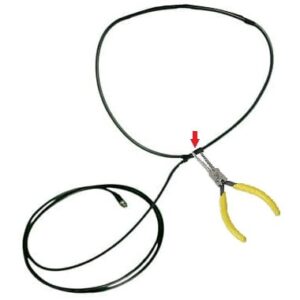
- Clean & Tighten Connectors: Ensure all coaxial cable connections are secure and free of corrosion.
- Check Feedline: Examine the coaxial cable for damage, such as cuts or kinks, which can compromise continuity.
3. Address Interference
Interference can cause erratic behavior in your MagLoop.
- Eliminate Nearby Electronics: Devices like routers, TVs, or power supplies can introduce noise. Move your antenna away from these sources.
- Grounding: Proper grounding can reduce noise and improve performance.
- Use a Common Mode Choke: Adding a choke to your feedline can help suppress unwanted RF interference.
4. Evaluate Placement
The placement of your MagLoop can greatly affect its performance and even detune it.
- Height and Orientation: Experiment with different heights and orientations to find the optimal position for your operating frequency.
- Avoid Metal Objects: Keep the antenna away from large metal surfaces, which can detune the loop or cause signal distortion.
- Indoor Use: If operating indoors, try placing the antenna in a less obstructed area or near a window, with the leading edge facing the window.
5. Test the Components
If the above steps don’t resolve the issue, it may be time to test individual components.
- Capacitor Testing: Use a multimeter to check the capacitance and ensure it matches the design specifications.
- Loop Integrity: Inspect the loop material for cracks, bends, or other damage that could affect its resonance.
- Power Handling: Ensure the antenna is rated for the power level you’re using. Overpowering can damage components.
6. Additional Information
If you’re still facing challenges, don’t hesitate to take a look at the following FAQs about Magnetic Loop Antennas.
- Adjust your Mic Gain First
- Tips for using MagLoop Magnetic Loop antennas by Alpha Antenna
- MagLoop performance Indoors, Basement, or Outdoors
- MagLoop tuning; Can I use a tuner on a Magnetic Loop antenna?
- Is a MagLoop directional?
- MagLoop Far Field Signal Pattern by Alpha Magnetic Loop Antenna
- RF exposure? Considerations when using Magnetic Loop Antenna
We are Here for You!
As humans make the Alpha Loops, we occasionally can make mistakes. Shipping can bring out an issue that may not have been observed during testing. So, your patience and understanding are greatly appreciated as we work to resolve any issue you may have.